


How Small Businesses Can Protect Themselves from Cyber Attacks
Cyber attacks are no longer a problem only for large enterprises—small businesses are increasingly becoming prime targets. Hackers know that smaller companies often lack the resources and expertise to implement robust cybersecurity defenses, making them vulnerable to data breaches, ransomware, and phishing scams. However, even with limited budgets, small businesses can take effective steps to safeguard their digital assets. Here are practical strategies to protect your business from cyber threats.
1. Use Strong Passwords and Multi-Factor Authentication (MFA)
Weak or reused passwords are an easy target for hackers. Strengthen your defenses by encouraging employees to use complex passwords and activate MFA wherever possible.
Actionable Tips:
- Use password managers to create and store strong, unique passwords.
- Enable MFA for email, cloud platforms, and financial accounts to add an extra layer of security.
2. Train Employees on Cybersecurity Awareness
Your employees are the first line of defense against cyber threats, but they can also be the weakest link if untrained. Phishing emails and social engineering attacks are common entry points, so educating staff is essential.
Actionable Tips:
- Provide regular training on identifying phishing emails and suspicious links.
- Conduct simulated phishing exercises to test employees’ readiness.
3. Keep Software and Systems Up to Date
Hackers often exploit vulnerabilities in outdated software to gain access to systems. Regular updates and patches are crucial to closing these security gaps.
Actionable Tips:
- Set up automatic updates for operating systems, browsers, and antivirus software.
- Ensure third-party apps and plugins are regularly patched.
4. Back Up Data Regularly

Ransomware attacks can lock your data, potentially crippling operations. Having regular, secure backups ensures you can recover quickly without paying a ransom.
Actionable Tips:
- Maintain both local and cloud backups of critical data.
- Automate backups to run at least once a day.
5. Implement Endpoint Security Solutions
With remote work becoming more common, protecting devices that access your network is crucial. Endpoint security software helps prevent malware and other threats from compromising your systems.
Actionable Tips:
- Use antivirus software and enable firewalls on all devices.
- Monitor remote access and ensure devices are configured with secure settings.
6. Secure Your Wi-Fi Network
Hackers can infiltrate networks through unsecured Wi-Fi. Make sure your network is encrypted and hidden from unauthorized users.
Actionable Tips:
- Use strong WPA3 encryption on your Wi-Fi network.
- Disable public access to business Wi-Fi or create a separate guest network.
7. Develop an Incident Response Plan
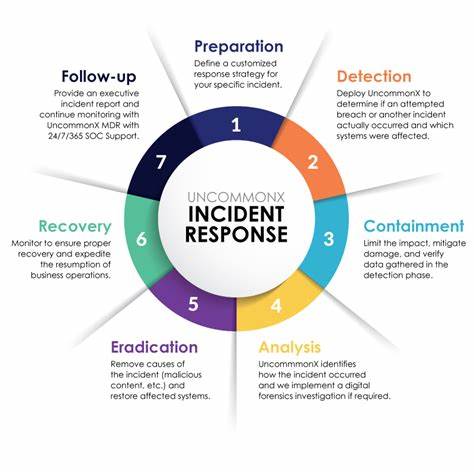
Even with the best security practices, no business is immune to cyber-attacks. Having an incident response plan allows you to act quickly and minimize damage in the event of a breach.
Actionable Tips:
- Identify key personnel and assign responsibilities for handling incidents.
- Establish protocols for notifying affected parties and authorities.
8. Use Managed Security Services (MSS)
If your business lacks the resources to manage cybersecurity internally, outsourcing to a Managed Security Service Provider (MSSP) can provide expert protection at a reasonable cost.
Actionable Tips:
- Look for MSSPs that specialize in small business cybersecurity.
- Ensure they offer round-the-clock monitoring and support.
Conclusion
Cybersecurity may seem daunting, but small businesses can take meaningful steps to protect themselves without breaking the bank. By adopting strong passwords, training employees, keeping software updated, and backing up data, you can significantly reduce your risk of cyber attacks.
At Repostar, we specialize in affordable cybersecurity solutions tailored to meet the needs of small businesses. Contact us today to learn how we can help you safeguard your company against emerging threats.

A WordPress Commenter
December 20, 2021Hi, this is a comment.
To get started with moderating, editing, and deleting comments, please visit the Comments screen in the dashboard.
Commenter avatars come from Gravatar.